Use Casper
Build
Start Building
Ecosystem

Use Casper
Build
Start Building
When you swap tokens or mint an NFT, you’re interacting with a smart contract. Across blockchain networks, apps usually handle that interaction for you: you click a button, and the app calls the relevant contract function. But if there’s no app, or it doesn’t offer the action you need, interacting with the contract directly generally requires developer tools.
Contract Interact, a new feature in CSPR.live, brings those functions within reach through the explorer. You can check a token balance, withdraw a spending approval an app offers no way to revoke, or use a contract that has no frontend at all, subject to the contract’s permissions.
Starting with CSPR.live 3.10.0, every Contract Package page has a new Interact tab where users can read contract data and submit transactions through a form, without command-line tools.
It is available in beta on both CSPR.live and CSPR.live Testnet.
The CSPR.live redesign made activity on Casper easier to follow. Contract Interact extends that approach to using the contracts themselves, in the same place.Now, instead of only seeing what contracts do, you can use them, in the same place.

Apps and websites show you data, but the contract itself is the source of truth. With Contract Interact you can read that data directly from the contract, for any account, without relying on anyone's interface.
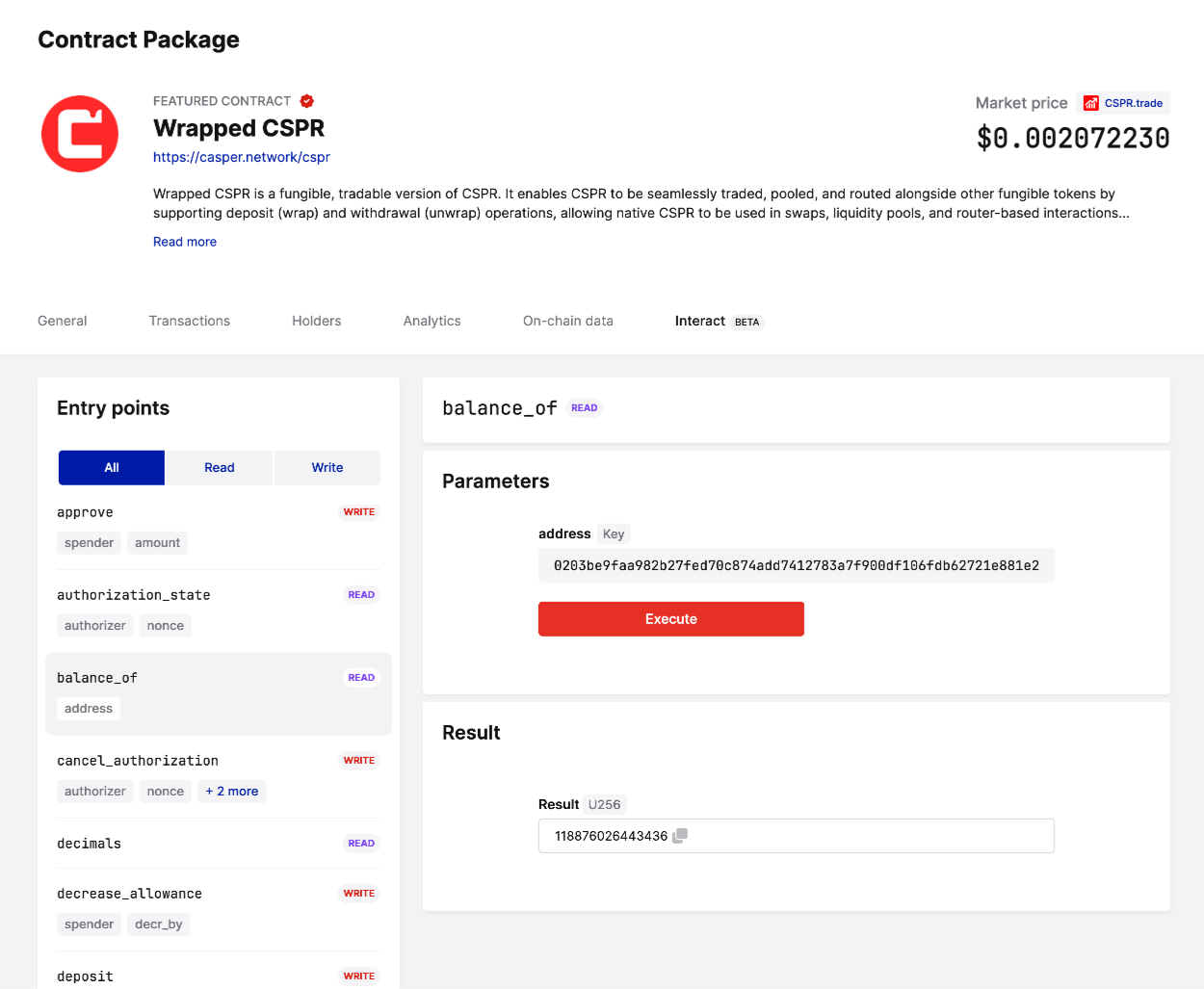
Example: checking a token balance. Open the token's Contract Package page, select the ‘balance_of’ entry point, paste the account's public key and click Execute. The result comes straight from the token contract.
Apps usually expose only their most common actions. The rest of a contract's functions are still there, just out of reach.
Example: removing a token allowance. When you use a DEX or another app, it often asks you to approve it to spend your tokens. Granting that approval takes one click, but an app may offer no way to take it back. With Contract Interact, you can do it yourself: first check the current value with the ‘allowance’ entry point, then reduce or remove it, depending on the token contract, with ‘decrease_allowance’ or by calling ‘approve’ with an amount of 0. This is a WRITE call, so it requires a Transaction Payment and your signature (more on that below).
Some contracts are useful but never got an interface of their own.
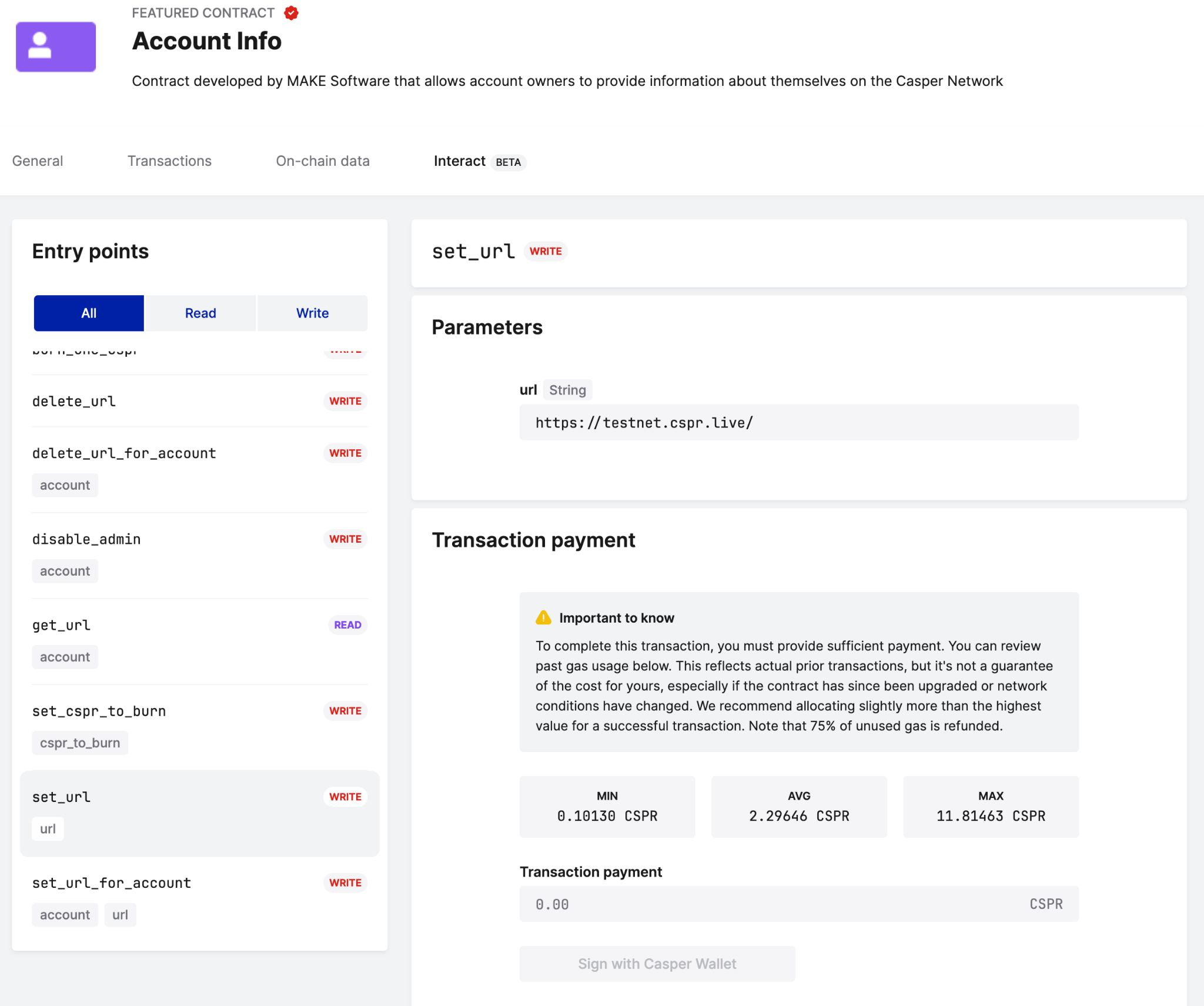
Example: Account Info. Validators and other accounts use the Account Info contract to publish a link to their public profile, such as their name, logo and website, which CSPR.live then displays. There has never been a dedicated app for it, so setting it up meant using the command line. With Contract Interact, you can call ‘set_url’ from the contract's page and sign the transaction with your wallet.
For developers, Contract Interact is a quick way to check a contract before (or instead of) building a frontend.
Example: a hackathon project. At a hackathon, time is short and the frontend is often the last thing to come together. Teams can deploy their contract to Testnet and use Contract Interact to call its entry points right away, without waiting for an interface or writing scripts. Each call shows its result right in the form. If a call fails, the error message appears immediately, so you can fix the issue and try again. READ entry points then let you confirm that the contract's state changed as expected.
Calling smart contracts is a technical topic, and the tools for it usually look the part: raw input fields, strict data formats, and fees you're left to guess. We wanted Contract Interact to be usable by anyone with a wallet, so we went the extra mile:
It's still a technical feature, but we've done as much of the heavy lifting as we could, so you don't have to.
Contract functions are called entry points. The Interact tab lists those of the contract’s latest version and labels them READ or WRITE.
READ: check information
READ calls retrieve data without committing changes to the blockchain. CSPR.live uses speculative execution, so users pay no transaction fee.
Enter any required parameters and click Execute. For supported account-oriented Key inputs, you can use a public key or an account hash, with or without the account-hash- prefix. CSPR.live handles the conversion.
WRITE: make changes
WRITE calls submit changes such as transfers, swaps, or mints. Enter the parameters, set the Transaction Payment, and sign with your wallet. You can follow the transaction’s status in the form and open the Transaction Details page for more information.
Every WRITE call needs a Transaction Payment to cover the cost of execution. Getting it right matters:
In short: paying a bit too much costs little, paying too little costs everything.
To help you decide, Interact shows the minimum, average and maximum gas used by previous successful calls of the entry point, together with a table of past transactions, whenever that history is available. We recommend:
Keep in mind that different inputs or a change in the contract's state can change the cost.
Some entry points require you to send CSPR to the contract itself, for example when wrapping CSPR into Wrapped CSPR. For these, a separate Amount field appears. Amount is what you send to the contract. Transaction Payment is what you pay for executing the call.
CSPR.live detects which entry points need an Amount from on-chain data or, when that is missing, from transaction history. If it can't tell, it lets you decide. A wrong choice will make the transaction fail and the Transaction Payment will be lost, so if you're unsure, check the project's documentation first.
Casper Network is permissionless: anyone can deploy a contract, and CSPR.live has no control over what gets deployed. A contract being visible on CSPR.live is not an endorsement.
Contract Interact is available on CSPR.live and CSPR.live Testnet. Search for a contract by name, open its Contract Package page, and select Interact.
During beta, some contracts or execution scenarios may not work as expected. Report errors, incorrect labels, or confusing interactions at feedback.cspr.live. Every report helps, even a small one.
"Explore Differently" began with making activity easier to follow. With Contract Interact, you can go from reviewing a contract's history to using it, all in the same place.


.png)